Tool 09 · Karaoke video · Free · No signup
Karaoke video maker.
The song, the words, and a fill that moves through each line as it is sung. Search the song or drop the track, time the lines once, export a 1080p MP4. Nothing uploads.
01 Audio
Analyzed on your device. Nothing uploads.
02 Style
Words · how each line comes in
Scene · what plays behind the words: the cover, the Poster paper, or one of the visualizer scenes
03 Lyrics
04 Timing
The space bar taps too. Click a time in the list to jump there.
05 Details
06 Export
Add a track above first.
Made with this tool
How to make a karaoke video
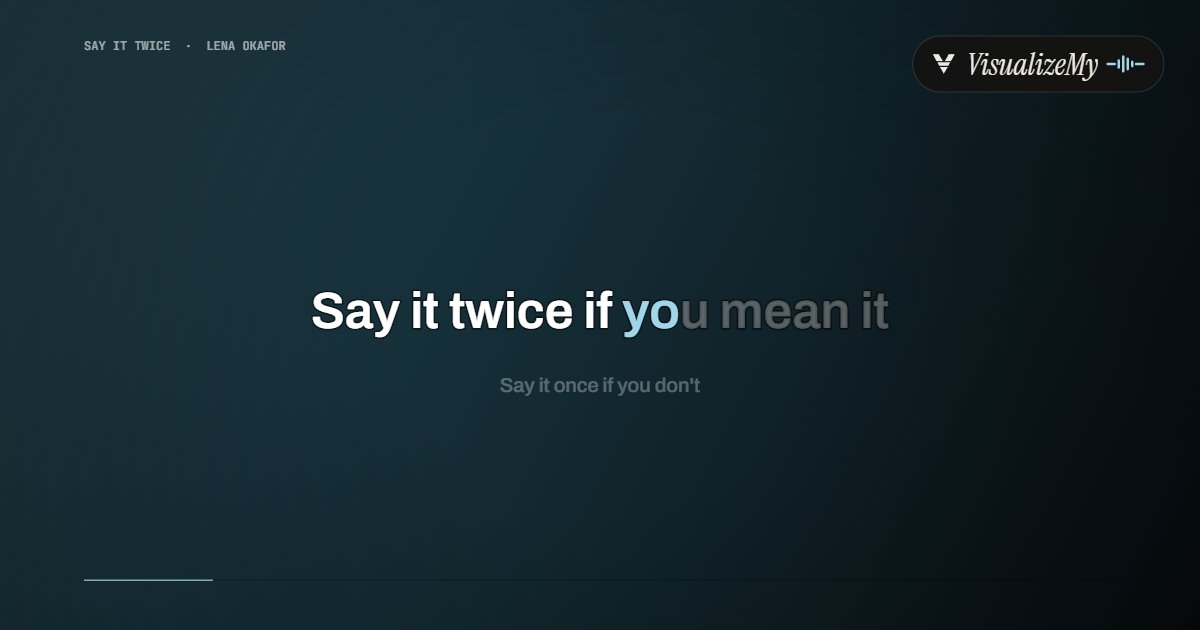
A karaoke video is the lyric video with a cue: the singer needs to know not just which line is up but where in it the voice is. The Karaoke style gives each line a fill that travels through the words over the line's time, on the blurred cover, in type large enough for a TV across the room. Timing is one listen, the rendering happens in your browser, and the file has no watermark.
- Search the song by name, or drop the track, ideally the instrumental, as MP3, M4A or WAV.
- Searched? The timed lyrics arrive; pick the first line you hear. Your own file? Paste the lyrics, press play, tap when each line starts.
- Keep the Karaoke style, set the title and the cover, and choose 16:9 for a screen or 9:16 for a phone.
- Export the whole song or a clip as a 1080p MP4 with the audio.
Related
- Lyric video makerThe same tool with all eight lyric styles.
- Worship lyric video makerFor the screen in church: two lines to a slide.
- How to make a lyric videoLyrics, timing, style, platform specs.
- Music visualizerFor songs: nineteen styles that follow the beat.
- MP3 to MP4The audio and a cover as a video file.
Questions
How does the word highlighting work?+
Each line waits on screen in grey and fills with color from left to right across the time the line is sung, word by word, the way a karaoke screen does. The line timing comes from the timed lyrics of a searched song, or from your taps on your own file; the words inside a line are spread across its duration.
Does it remove the vocals?+
No. For a true karaoke track, bring an instrumental: many songs have an official instrumental or a karaoke version, and vocal removers exist for the rest. With the original recording the result is a sing-along video, the words filling in time with the singer, which is what most people post.
Where do the lyrics come from?+
Search the song by name and the timed lyrics come from the open LRCLIB database; you pick the first line you hear in the 30 second store preview and the rest follow. With your own file, paste the lyrics, press play and tap when each line starts.
Can I use my own backing track?+
Yes: drop the instrumental, paste the lyrics, play it once and tap each line in. The whole song, up to ten minutes, exports as a 1080p MP4 with the backing track.
Is it really free?+
Yes. 1080p, the whole song up to ten minutes per export, no account, no watermark. The video is rendered in your browser; nothing uploads.
Which frame for a TV, and which for a phone?+
16:9 for a TV, a projector or YouTube. 9:16 for Reels, Shorts and TikTok. 1:1 for feeds. The Karaoke style has its own layout for each, the words large and centered.
What is a karaoke video?+
A video of a song, usually the instrumental, with the lyrics on screen and a cue that moves through the words as they should be sung, so a singer knows when to come in. The cue here is the fill: the line sits in grey and turns to color word by word.