Tool 25 · Tone generator · Free · No signup
Tone generator.
Any frequency from 1 Hz to 20 kHz as a sine, square, triangle or saw wave, on the left, the right or both, steady or swept. Press Play, change anything while it sounds, and download it as a WAV.
440 Hz
A4
Wave
Channel
Mode
Download
About 1.7 MB. 16-bit, 44.1 kHz stereo at −6 dBFS, with a 5 ms fade at each end so it does not click.
Start with the volume low: a pure tone sounds louder than music at the same setting, and square and saw waves louder again. The slider turns the tone down from your system volume, never past it.
What it looks like
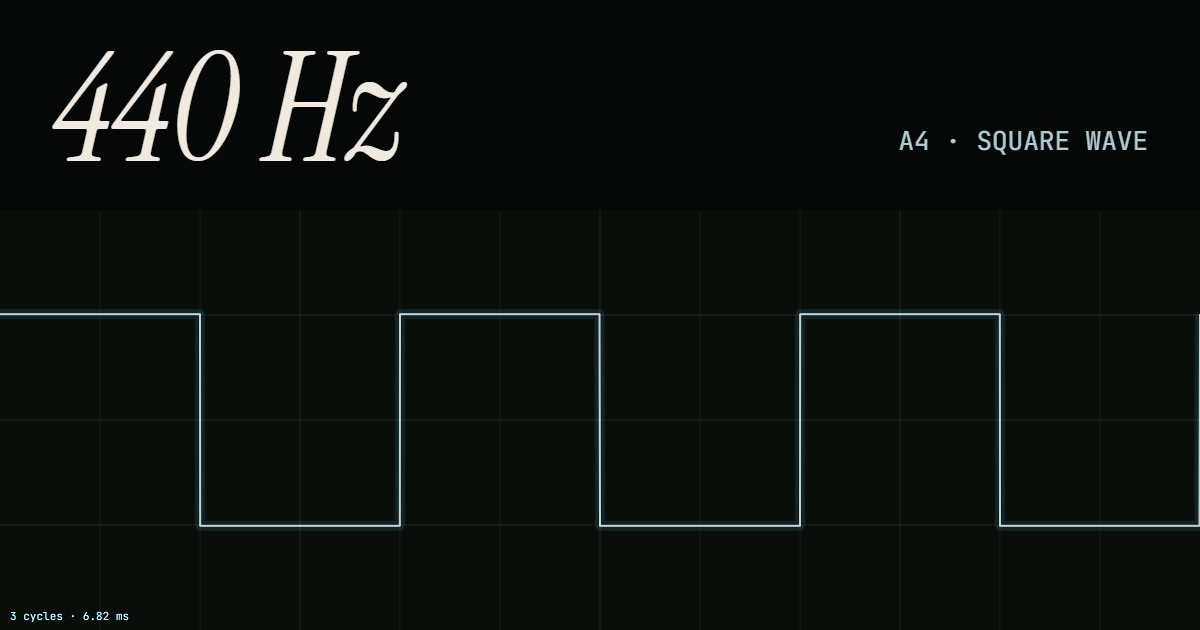
The picture under the number is the shape of the wave, three cycles wide whatever the pitch, so it stands still while you change the frequency and the time across the frame tells you the period: 6.82 ms for three cycles of 440 Hz. Square, triangle and saw are drawn as the ideal shapes; what plays is built by the browser from a limited set of overtones, so the corners are slightly rounded and a square's flat tops carry a small ripple. That keeps high notes clean instead of full of whistling artefacts. To see a whole song drawn from its sound, use the music visualizer.
How to generate a tone
The tone is made by the browser's own oscillator as it plays, so nothing loads and nothing is sent anywhere. Changes glide over a few hundredths of a second instead of jumping, which is why moving the slider sounds like a smooth bend and not a string of clicks. The file is rendered separately, the same oscillator run offline, so it is exact to the sample and does not depend on the volume slider.
- Turn your system volume to a normal level and the slider on the page low.
- Set the frequency: drag the slider, type the number, step by half steps or octaves, or press a preset such as 440.
- Pick the wave (sine for a pure tone) and the channel, then press Play. Everything can change while it plays.
- For a sweep, choose Sweep, set the start, the end and the length, and press Play.
- To keep it, set the length in seconds and press Download WAV.
Related
- Sound testReady-made checks: left and right, a full sweep, a bass sweep and a phase test.
- Music visualizerNineteen styles that turn any sound, a test tone included, into a video.
- Bass boosterLift the low end of a song, MP3 or WAV.
- Tap tempoThe BPM of a song from taps on a key, with a click to check it.
Questions
Which waveform should I use?+
Sine for anything that needs one frequency and nothing else: tuning, hearing checks, finding a resonance or a rattle. The other three add overtones on top of the frequency you set. Square has only the odd ones and sounds hollow and buzzy, a little like a clarinet; triangle has the same odd ones but much weaker, so it sits between a sine and a square, soft like a flute; saw has every overtone and is the brightest, the raw sound behind synth strings and brass. They also sound louder than a sine at the same setting, so turn down when you switch.
What is 440 Hz, and is 432 Hz better?+
440 Hz is the A above middle C, the pitch most orchestras and every tuner use as the reference; press 440 and tune your A string to it. 432 Hz is the same note about a third of a semitone lower (32 cents flat). The claims that it is more natural or healing have no evidence behind them; it is a perfectly good tuning if a recording or a choir uses it, and the 432 button is there for that.
Can I hear 1 Hz or 20 kHz?+
Not as a tone. Below about 20 Hz the ear stops hearing pitch: a sine at 5 Hz is silent, but a speaker cone visibly moves with it, and a square wave at 5 Hz is heard as five clicks a second, one at each edge. At the top, most adults lose the tone somewhere between 14 and 17 kHz and the limit falls with age; 17 kHz, the "mosquito" tone, is usually audible to teenagers and to far fewer adults. To find your own limits in one go, use the sweeps on the sound test.
How do I save a tone as a file?+
Set the tone, type the length in seconds, and press Download WAV. The file is 16-bit, 44.1 kHz stereo with its peaks at -6 dBFS (half of full scale, so there is headroom to mix it or turn it up), with a 5 ms fade in and out so it does not start or end on a click, and it is named after the tone, for example tone-440hz-sine-10s.wav. The volume slider does not change the file. It is WAV and not MP3 on purpose: MP3 encoders cut the highest frequencies and smear a pure tone, which defeats the point of a test tone.
How does the sweep work?+
Choose Sweep, set where it starts and ends and how long it takes, and press Play. The frequency glides on a logarithmic scale, the same time for every octave, which is how pitch is heard, so 20 Hz to 20 kHz spends as long between 20 and 40 Hz as between 10 and 20 kHz. A sweep can also run downwards. The download saves the same sweep, which is the usual test signal for measuring a speaker or a room.
Can I use it to find my tinnitus frequency?+
Many people do: play a sine, step it with the half-step and octave buttons until it matches the ringing, then fine-tune the number. Keep the volume low, and match by moving the tone, not by turning it up. The match is only a description you can take to an audiologist or a sound therapy app; it is not a hearing test or a diagnosis.
How accurate is the frequency?+
As accurate as your device's audio clock, which keeps 440 Hz within a few hundredths of a hertz. You can type a frequency to two decimals; the slider and the step buttons round to a tenth above 100 Hz. The note under the number is the nearest equal-tempered note with A4 = 440 Hz, and the cents show how far off it you are.