Tool 24 · Sound test · Free · No signup
Sound test.
Left, right and both, a sweep from 20 Hz to 20 kHz, a bass sweep and a phase check, for speakers or headphones. Press a test and it plays; the picture shows what each channel is doing.
Headphones on the right way round, or sit centred between the speakers. Every test plays until you press it again.
Start low and turn up. Sweeps near 20 Hz and 20 kHz can be loud on speakers that play them even when you cannot hear them.
What the picture means
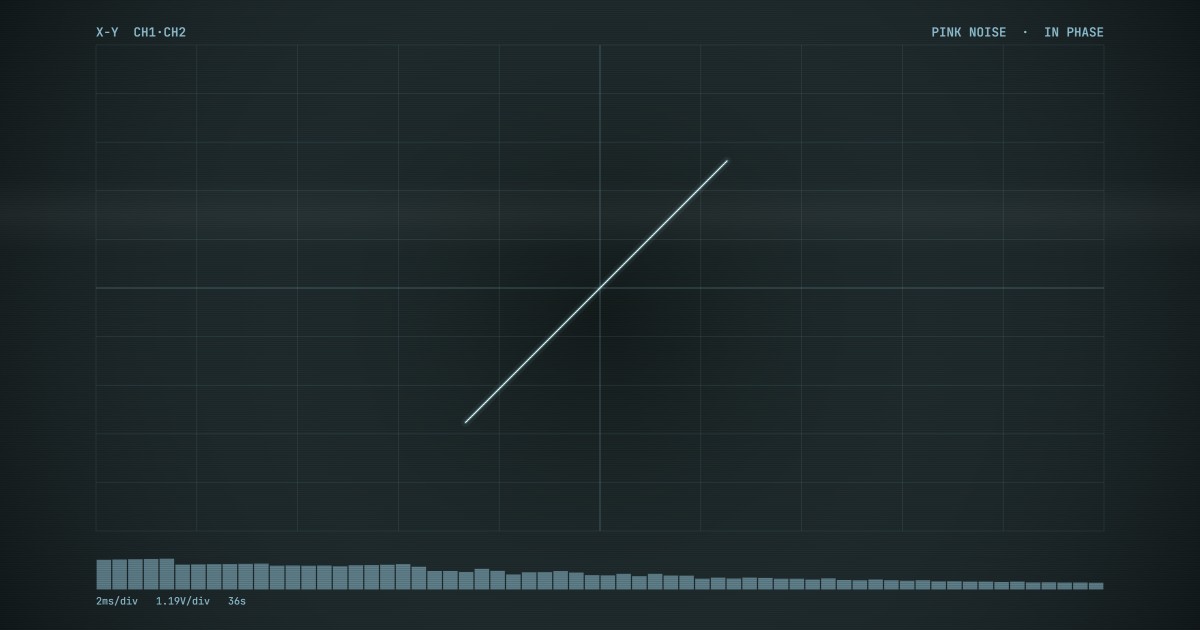
The picture is the Scope style of our music visualizer, an X-Y oscilloscope: the left channel moves the trace across and the right channel moves it up. Left only draws a flat line, right only an upright one, the same sound on both a rising diagonal, and the phase test flips between that diagonal and a falling one. The bars under it are the spectrum, so a sweep shows as one bar walking from left to right. Drop a song on the visualizer and a stereo mix opens the line into shapes.
How to test your speakers or headphones
Every test is made in the browser as it plays: the beat is a short loop we synthesise, the sweeps are a sine wave gliding on a logarithmic scale (the same time for each octave, which is how pitch is heard), and the phase test is pink noise, which has equal energy per octave and sounds even across the range. Nothing is downloaded and nothing listens: there is no microphone, so the page cannot hear your speakers, only you can. Use the same volume for the whole run, so the tests compare.
- Turn your system volume to a normal listening level and put headphones on the right way round, or sit centred between the speakers.
- Press Left, then Right. Each should come from one side only; press Both and it should sit in the middle.
- Press Sweep and press Stop when the tone disappears. That is the top of your hearing or of your speakers.
- Press Bass and press Stop when you first hear it. That is how low your speakers or headphones go; listen for rattles on the way up.
- Press Phase. In phase should sound fuller and more centred than out of phase. If not, swap the wires on one speaker.
Related
- Tone generatorSet the tone yourself: any frequency, four waveforms, either channel, saved as a WAV.
- Music visualizerThe Scope on this page is one of nineteen styles. Drop a song and export it as a video.
- Bass boosterFound where your bass rolls off? Lift it in the file, MP3 or WAV.
- Volume boosterA track too quiet on these speakers: raise it or match a loudness target.
- Spotify visualizerThe same styles drawn live from whatever is playing.
Questions
How do I test left and right?+
Press Left: the beat should come from the left speaker or the left ear only, and the picture draws a flat line. Press Right for the other side and an upright line. If Left comes out on the right, the headphones are on backwards or the speaker cables are swapped. If both tests come out of both sides, something is folding the sound to mono: a phone or laptop speaker that is really one speaker, or the mono audio switch in the accessibility settings of Windows, macOS, iOS or Android.
What does the 20 Hz to 20 kHz sweep tell me?+
Where the sound stops for you. The tone climbs a little faster than an octave every three seconds; press Stop the moment it disappears and the page shows the frequency. Children hear close to 20 kHz, most adults stop somewhere between 14 and 17 kHz, and the limit keeps falling with age, so a low number is usually your ears, not the speakers. Run it on two devices to tell the difference: if the laptop stops a few kHz before the headphones, that is the laptop.
How low should the bass test go?+
It depends on what you are testing. The bass sweep starts at 20 Hz, below what most speakers play, and climbs to 120 Hz; press Stop when you first hear it. Phone speakers rarely play anything in this range, laptop speakers start somewhere around 100 Hz, small bookshelf speakers around 50 to 60 Hz, and a subwoofer or sealed over-ear headphones can reach 20 to 30 Hz. Earbuds lose most of their bass when the tips do not seal, so the test is also a fit check. Listen for buzzing and rattling as the tone passes through: that is a loose panel or a speaker at its limit, not the signal.
What is the phase test for?+
Checking that both speakers push air the same way. The test plays pink noise in phase for 2.5 seconds, then with the right channel flipped for 2.5 seconds, and repeats. In phase should sound solid and centred; out of phase sounds wide, hollow and thin in the bass, and on headphones it feels oddly inside or around your head. If your speakers sound the other way round, the plus and minus wires are swapped on one of them; swap them back on one speaker only. The picture shows the same thing: a rising diagonal in phase, a falling one out of phase.
Can it test 5.1 or 7.1 surround sound?+
Not properly. The page tests the front left and right; a surround test has to address every speaker on its own, and on most setups the browser hands its sound to the system as stereo. If your browser does report more channels, the page says so under the tests. For a full surround check use the test tone in your receiver or soundbar menu, or on Windows, Sound settings, the device, then Configure, which plays each speaker in turn.
Can a sound test damage my speakers or my ears?+
It can if it is loud. The tests start at 35 percent and the volume slider only turns them down from your system level, never past it. Pure tones carry their energy at one frequency: a high tone at full volume is hard on small tweeters, and the top of the sweep can be loud on speakers that play it even when you cannot hear it. Start low, turn up until it is comfortable, and stop if anything distorts.
Why is there no sound?+
Check the obvious first: the system volume, which output device is selected, and that the browser tab is not muted. Bluetooth headphones can take a second to wake up, so the first beat may be lost. On an iPhone with an older iOS the ring and silent switch mutes sound from web pages too. The page needs nothing else: no microphone, no file, no permission, and nothing is recorded or sent.