Tool 26 · Key detector · Free · No signup
Key detector.
Drop a song, several songs, or search one by name, and get its key and Camelot code, the relative key with the same notes, and the keys that mix with it. Then hold the home chord under the song and hear whether it fits.
01 Audio
Analyzed on your device. Nothing uploads.
or drop a whole folder of songs on the page
02 Key
Key
--
Drop a song above, or search one by name
Camelot
--
The notes, made visible
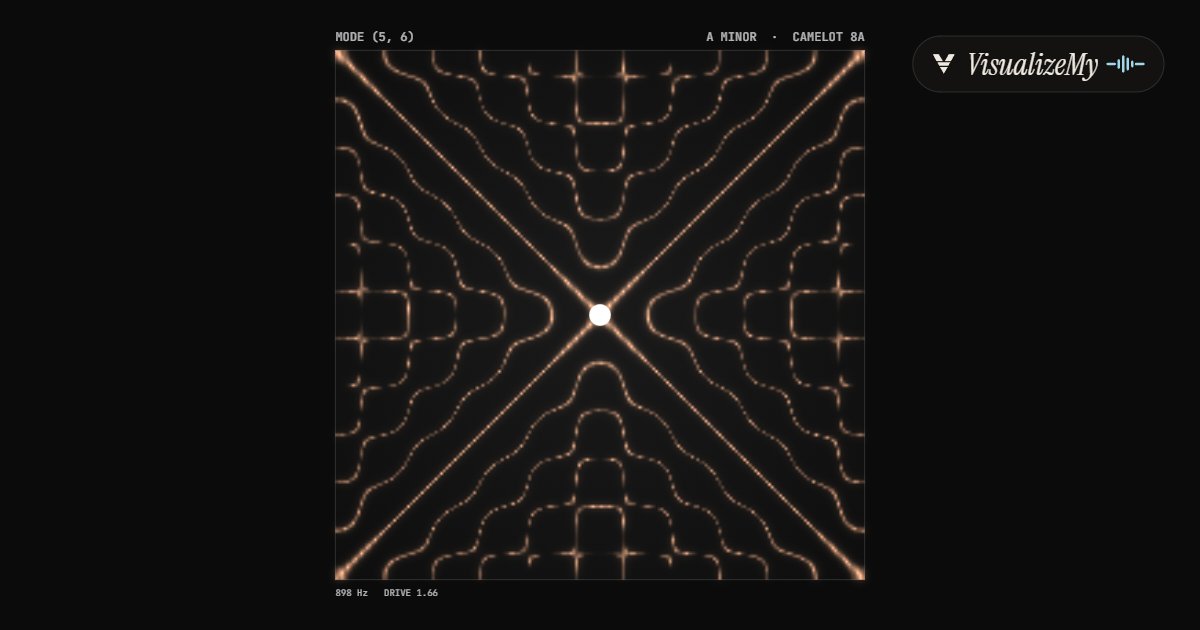
The frame above is the Chladni style of our music visualizer: sand on a plate that vibrates with the song gathers along the lines that stay still, and the figure changes with the notes being played, the same physics a key reading is built on. Every style there reads the song this page reads, and the video carries your cover and title.
How to find the key of a song
A key is a set of seven notes plus one of them that feels like home. Software is very good at the first part, counting which notes a song uses, and less sure about the second, which is why the result comes with how well it fits, the runner-up, and a drone to check by ear. The reading covers the whole file; a song that changes key for the last chorus reads as the key it spends the most time in.
- Drop an MP3, M4A or WAV on the page, or several at once, or search the song by name to use its 30 second store preview.
- Read the key and how sure the reading is. A clear reading is above about 75%.
- If you are unsure between the key and its relative or the runner-up, play the song with the home chord held under it and switch between the two.
- For a DJ set, read the Camelot code and the four keys it mixes with, or sort the session list by Camelot.
- Need it in another key? Shift it by semitones in the audio speed changer.
Related
- BPM and key finderThe tempo first, with half and double time and a click laid over the song.
- Audio speed changerMove a song up or down by semitones and keep its tempo.
- Music visualizerNineteen styles that turn the song into a video, cover and title included.
- Tone generatorAny pitch as a steady tone, with the nearest note and cents.
- Tap tempoThe BPM from taps on a key, for when you only have your ears.
Questions
How does it find the key?+
It listens to the whole file, not a snippet. Every note between C2 and C7 is folded into one of the twelve pitch classes, each moment counted equally so a loud chorus does not outvote the verses, and the twelve totals are compared with the shapes of all 24 major and minor keys (the Krumhansl and Kessler profiles, from listening experiments on which notes feel at home in a key). The best fit is the key, and the percentage is how well it fits: around 90% for a song that sits clearly in one key, under 60% for one that does not.
It says C major and my chords look like A minor. Which is it?+
They share every note, so the notes alone cannot decide; what decides is which chord feels like home, the one the song keeps landing on. Press play, choose Home chord, and switch between the two keys: the right one blends in and the song settles onto it at the ends of phrases; the wrong one sounds like it is waiting for something. The runner-up key is usually this relative, or the key a fifth away, which shares six of seven notes.
What do the Camelot matches mean?+
They are the keys a DJ can mix into without a clash. The Camelot wheel numbers the 24 keys so that one number up or down is a fifth away (one note different), and the same number with the other letter is the relative key (no notes different). From 8A, A minor, the safe moves are 8A, 7A (D minor), 9A (E minor) and 8B (C major). The list on this page can sort a whole session that way, so neighbours mix into each other.
Why does another app give a different key?+
Usually for one of four reasons. It picked the relative key, which has the same notes. It picked a neighbour a fifth away, often because the hook leans on that chord. The song is modal, a Dorian or Mixolydian groove that is neither plainly major nor minor, so every detector has to force it into one. Or the recording is not tuned to A = 440: this page only counts energy within about a third of a semitone of each note, so a track tuned a quarter-tone off reads poorly everywhere. The fit percentage drops in all four cases, which is the hint to check by ear.
Can I find the key of a song without the file?+
Yes. Search it by name and the 30 second preview that music stores publish is read instead. Thirty seconds is usually enough, but a preview is often the chorus, and a chorus that sits on the relative chord or changes key reads less surely than the whole song.
Can I check several songs at once?+
Yes. Choose Add several files, or drop a handful or a whole folder's worth on the page. They are read one after another, each joins the session list with its key, Camelot code, how sure the reading is and the tempo, and By Camelot orders the list for a set. The list stays in the tab; nothing is saved anywhere.
I want to sing or play it in another key. Can I change it?+
Use the audio speed changer: it moves a song up or down by semitones and keeps the tempo, or changes the tempo and keeps the key. Moving a song more than two or three semitones starts to change the character of voices, so for a big change it is often better to pick a different capo or a transposed backing track.
Is my song uploaded?+
No. The file is decoded and read in your browser and never leaves your device. Only a song search goes through our server, and what it sends is the title you typed, to fetch the store preview.