Tool 27 · Metronome · Free · No signup
Metronome.
Set the tempo from 20 to 300 BPM, or tap it in, pick a time signature, put the accents where you want them, add eighths, triplets or sixteenths, and press Start. Save any number of bars as a click track.
120BPM
Allegro · 4/4
Tap a beat to change it: accent, beat, soft, off. Space starts and stops, T taps the tempo, the arrow keys nudge it.
Time signature
Subdivision
Sound
03 Download
About 750 KB. 192 kbps is transparent for most music; 320 if it is going back into an editor. One file: click-track-120bpm-4-4-16-bars.mp3.
What it looks like
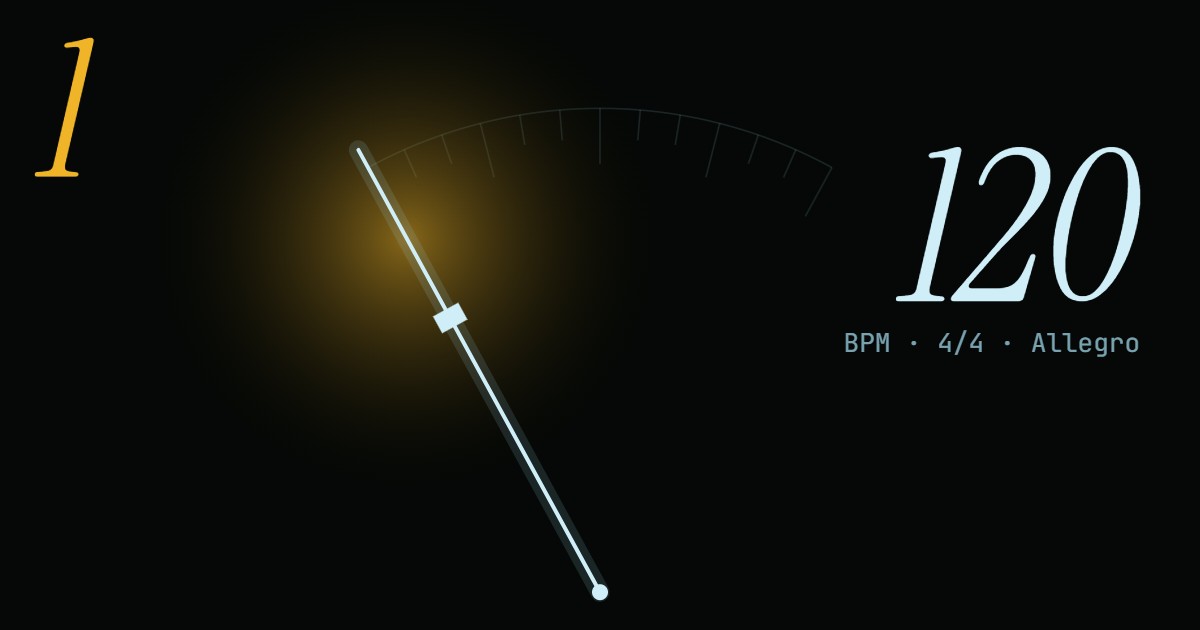
The pendulum reaches the end of its swing on every beat, the way a wind-up metronome's arm does, and the side it lands on lights up: amber for an accent, pale blue for an ordinary beat, nothing for a beat you have turned off. Watching it is enough to keep time with the sound off, and the beat buttons underneath light in turn so you can see where you are in the bar. To see a whole song move on its beat, use the music visualizer.
How to use the online metronome
The clicks are made in the browser, short tones with a fast decay, so nothing loads and nothing is sent anywhere. Each sound has three weights: the accent a fifth higher and loudest, the normal beat, and a soft beat for the inner beats of 6/8 and the like; subdivisions are higher and quieter again. The download writes the same clicks sample by sample, so the file sounds exactly like the page.
- Set the tempo: drag the slider, type it, step it by 1 or 5, or press Tap on the beat three times or more.
- Pick a time signature such as 4/4, 3/4 or 6/8, or set the beats a bar with minus and plus.
- Tap any beat to make it an accent, a normal beat, a soft beat or silent.
- Choose a subdivision and a sound, and press Start (or the space bar). Everything can change while it plays.
- To keep it as a click track, type the number of bars and press Download for an MP3 or WAV.
Related
- Tap tempoTap along with a song for its BPM: average, median, half and double time.
- BPM and key finderDrop the file and read its tempo and key without tapping.
- Audio speed changerA song slowed down to practise with, in the same key.
- Audio looperOne passage of a song on repeat, to drill it against the click.
- Tone generatorA steady 440 Hz, or any pitch, to tune to.
Questions
Does an online metronome keep steady time?+
This one does, because the browser's timer never plays a click. It only decides, ten times a second, which clicks fall in the next tenth of a second, and those are handed to the audio clock with their exact start times. The audio clock runs off the sound hardware, so a busy page or a slow timer can delay the planning but not the click. When the tab is in the background, where browsers slow timers down, it plans a second and a half ahead instead. Changes of tempo take effect from the next click, so speeding up mid-bar does not stumble.
How do I set 6/8, 7/8 or another odd meter?+
Press 6/8, 7/8, 9/8 or 12/8 and the metronome clicks every eighth note, with the accents where the groups start: 6/8 as 3 + 3, 7/8 as 2 + 2 + 3. The BPM then counts eighth notes, so a 6/8 song felt at 60 dotted quarters a minute is 180 here. If you would rather feel the two big beats, set 2/4 with the triplet subdivision at 60 instead. For any other grouping, tap the beat buttons under the pendulum: each tap cycles accent, beat, soft and off, so 7/8 as 3 + 2 + 2 is one tap on beat 4 and one on beat 3. The minus and plus buttons give any count from 1 to 12 beats a bar.
What are subdivisions for?+
They fill each beat with quieter, higher clicks: two for eighth notes, three for triplets, four for sixteenths. Slow practice is where they help most: at 50 BPM the gap between beats is long enough to rush or drag without noticing, and eighth-note clicks hold you to the grid. They also teach the feel of a fast passage at a slow tempo; once it is clean with sixteenths at 60, it is the same notes as eighths at 120.
Can I tap the tempo in?+
Yes. Press Tap, or the T key, on the beat three times or more and the tempo is set from the middle of your last eight gaps, so one late tap does not throw it. It also works while the metronome is running, to follow a song or a band. For a careful reading with an average, half and double time and an error estimate, use the tap tempo page.
Can I download a click track?+
Set the tempo, the meter, the accents, the subdivision and the sound, type how many bars, and press Download. The WAV is exactly that many bars long with the first click on its first sample, so it loops cleanly and lines up bar for bar in a DAW or a video editor set to the same tempo. An MP3 starts about 25 ms late, the silence every MP3 encoder puts at the front, which some apps trim and others (Chrome among them) do not; use WAV for lining up and MP3 for your phone. Files are mono, 44.1 kHz, and up to an hour long.
What do Largo, Andante and Allegro mean in BPM?+
They are moods more than numbers, and different metronomes print different ranges, but roughly: Grave below 40, Largo 40 to 60, Adagio about 66 to 76, Andante 76 to 108, Moderato 108 to 120, Allegro 120 to 168, Presto 168 to 200 and Prestissimo above that. The name under the number follows those ranges. A piece marked Allegro by its composer can sit anywhere in the range; the marking tells you the character, the metronome mark (if there is one) tells you the speed.
Does it work on a phone, and with Bluetooth headphones?+
Yes on a phone: the Start and Tap buttons are big and timing is taken the moment your finger lands. Keep the screen on, since phones may pause a web page's sound when the browser goes to the background or the screen locks. Bluetooth headphones and speakers delay all sound by a fifth of a second or so. The tempo stays exact, because every click is delayed the same, but you hear each click after the moment it marks, and the pendulum can look early. To play along, use the built-in speaker or a cable.