Tool 13 · Album cover maker · Free · No signup
Album cover maker.
Type a title and an artist, add a photo if you have one, and pick a layout, colours and a typeface. Download the cover as a 3000 by 3000 JPG, the size distributors ask for. No account, no watermark, and the photo never leaves your device.
01 Words
02 Photo · optional
Or drop one anywhere on the tool. It stays on your device. Use a photo you took or have the rights to: stores reject unlicensed stock photos.
03 Look
Preview. The download is 3000 × 3000.
04 Download
JPG is what DistroKid asks for; PNG if your distributor prefers it. Next: put it inside the song with the MP3 tag editor, or turn song and cover into a video with the music visualizer.
One title, three layouts
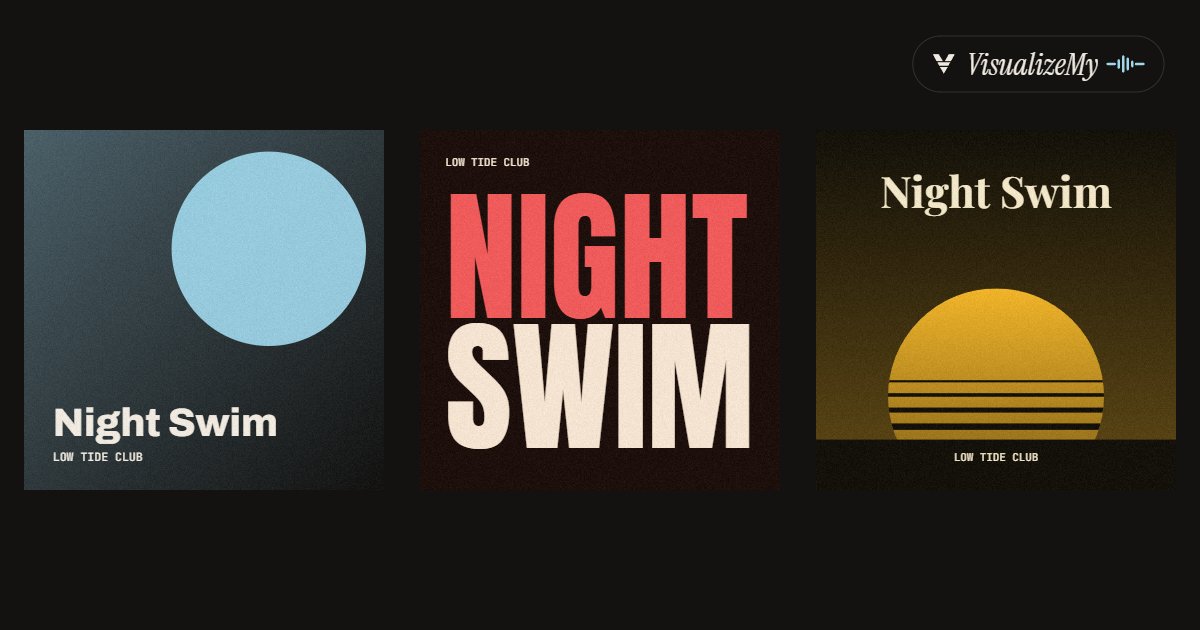
The image above is three downloads from this page with the same title and artist: Disc in Ink, Stack in Ember with the Poster typeface, Sunset in Gold with the Serif. Covers are judged at thumbnail size, in a list of other covers, so every layout keeps the title large and the colours few.
How to make an album cover
A cover has two jobs. In a store or a playlist it is a square about the size of a fingertip, next to fifty others, so it has to read as one strong shape and, ideally, as the title. On the release page and on a phone's lock screen it is shown large, so it also has to hold up at full size. That is why each layout here puts the title big against at most three colours, and why the file is made at 3000 by 3000 instead of scaled up from a preview. If you add a photo, Duotone maps it onto the two main colours of the palette, which keeps a busy phone picture from fighting with the type.
- Type the title of the album or single and the artist name. Add a small line such as EP or Vol. 2 if the release needs one.
- Add a photo if you have one: choose it or drop it on the tool, then keep it in colour or map it to the palette with Duotone or Black and white.
- Pick one of six layouts, then a palette and a typeface. The small previews show your title in every layout; Shuffle tries a random mix.
- Download the JPG. It is 3000 by 3000 pixels in RGB, ready for DistroKid, TuneCore, CD Baby or any other distributor.
- Put the same image into the MP3 with the tag editor, and use it for the visualizer video, so the cover is the same everywhere.
Related
- MP3 tag editorWrite the new cover, title and artist into the song file.
- Music visualizerThe song as a video built around this cover.
- MP3 to MP4The song and its cover as a still video for YouTube.
- Spotify Canvas makerThe looping clip that plays behind the song on Spotify.
- Animated album coverThe finished cover, moving with the song on a seamless loop.
- All guidesHow-tos and comparisons from the people who build the tools.
Questions
What size does cover art need to be for Spotify and Apple Music?+
Square, and 3000 by 3000 pixels to be safe. You do not upload to Spotify or Apple Music directly; your distributor does, and each sets its own floor. DistroKid, for example, takes 1000 by 1000 at the least but asks for 3000 by 3000, as a JPG, in RGB colour. Every cover this page downloads is exactly 3000 by 3000, RGB, so it clears all of them.
JPG or PNG?+
JPG, unless your distributor says otherwise. DistroKid asks for JPG, the file is a few megabytes instead of ten or more, and at the quality we save it you will not see a difference on any screen. Take the PNG if a distributor or a printer asks for it, or if you plan to edit the cover further and want no compression in between.
Why would a store reject my cover?+
The usual reasons, from DistroKid's own list: a web address, QR code or social handle on the art; logos of Spotify, Apple or social apps; prices; words like CD that point to physical media; a blurry, stretched or pixelated image; stock photos you do not hold a licence for; nudity. The same cover reused on two releases can also be refused. Nothing this page draws breaks those rules, so what is left to check is your own words and your own photo.
Can I use the cover commercially?+
Yes. The layouts, colours and the drawing on the canvas are ours and you may use what you make for anything, releases and merch included, with no credit. The typefaces are open fonts (Archivo, Anton, Playfair Display, Instrument Serif and JetBrains Mono, all under the SIL Open Font License), which allows commercial use of images set in them. The photo is the one thing we cannot clear for you: it has to be yours or licensed to you.
Is this an AI cover generator?+
No. It sets type and colour, and places your photo, the way a designer would lay out a sleeve; there is no generated imagery, which also means no question about who owns a generated picture. If you want a picture you do not have, take one: a phone photo in Duotone or Black and white, under a strong layout, often looks more like a record than a generated scene does.
How do I get the cover into the MP3 itself?+
Download the JPG, open our MP3 tag editor, drop the song and choose the cover there. It is resized to 1400 pixels for the file, which looks sharp on any phone and does not upset older car stereos, and the song is not re-encoded. Players, phones and our video tools then show it whenever the song plays.
Is my photo uploaded?+
No. The photo is read and drawn in your browser and the cover file is made on your device. Nothing about the photo or the words is sent anywhere; the page only counts that a cover was downloaded, with the layout and typeface, not the image or the text.