Guides · Oscilloscopes
Oscilloscope music: how sound draws pictures on a scope
Oscilloscope music is written so the left and right channels draw a picture on a scope. How it works, why it sounds that way, how to watch or make it for free.
November 5, 2026
In short
- Oscilloscope music is composed so its waveform draws pictures. In X-Y mode, the left channel moves the beam sideways and the right channel moves it up and down.
- The rate at which a shape is redrawn sets its pitch, and the shape sets its tone. That makes the sound and the image one design problem, not two.
- You don't need hardware to watch it. dood.al/oscilloscope, woscope and the free Oscilloscope app all play the audio files.
- On a real scope you need an analog model with X-Y mode, both inputs on DC coupling, and an audio output that passes DC. To make your own, start with the free version of osci-render.
Most oscilloscope displays show one signal against time. Switch a scope to X-Y mode and it stops sweeping: one input now moves the beam left and right, and the other moves it up and down. Plug in a stereo audio cable and the left channel becomes X while the right becomes Y.
Oscilloscope music is written for that setup. In the words of its best-known makers, it is music “where the visuals are drawn by the sound.” Nothing syncs a picture to the track. The waveform you hear is the path the beam follows, so changing the picture changes the sound, and changing the sound changes the picture.
Start with three tones
You can see the whole idea with plain sine waves.
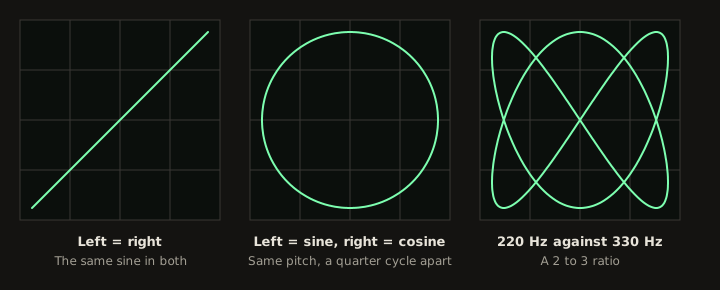
Send the same sine to both channels and X always equals Y, so the beam only travels along a diagonal. Delay one channel by a quarter of a cycle and the two now describe a circle, the same way sine and cosine do in a maths class. Change the ratio of the two pitches to 2 to 3 and you get a closed, looping figure.
These are Lissajous curves. Nathaniel Bowditch looked into them in 1815, and Jules Antoine Lissajous studied them in more detail in 1857, which is how they got his name. Audio engineers still use the same display to check whether a stereo mix has phase problems.
You can make these three yourself. This FFmpeg command plays the circle and renders it as a video, and I ran it as written. Swap the two expressions in the quotes for sin(2*PI*220*t)|sin(2*PI*330*t+PI/2) to get the third figure:
ffmpeg -f lavfi -i "aevalsrc='sin(2*PI*220*t)|cos(2*PI*220*t)':s=48000:d=5" -filter_complex "[0:a]avectorscope=s=720x720:mode=lissajous_xy:draw=line:scale=lin:zoom=0.9,vflip[v]" -map "[v]" -map 0:a -c:v libx264 -pix_fmt yuv420p -c:a aac circle.mp4
The vflip is there because FFmpeg draws Y downward. Without it, a mono signal slopes the wrong way compared with a real scope.
From a tone to a picture
A circle is easy because it has a formula. Any other outline works the same way: walk around the shape, and write the horizontal position into the left channel and the vertical position into the right.
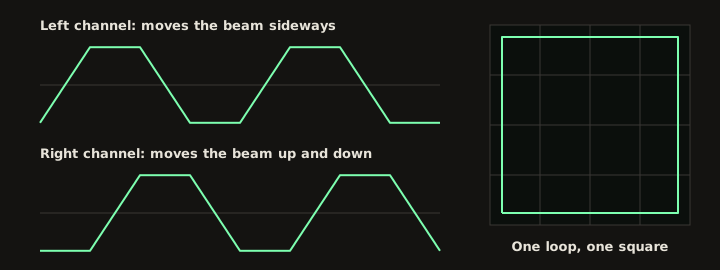
Play that loop 110 times a second and you hear an A two octaves below the A above middle C, and you see a square. Everything else follows from those two facts:
- How often the shape repeats sets the pitch. Redraw it 220 times a second and the note goes up an octave.
- The outline sets the tone. Sharp corners add high harmonics, so a square sounds buzzy and a circle sounds like a pure sine.
- Size is volume. A louder signal draws a bigger picture.
- Moving the shape changes the sound. Spinning a shape changes both channels, so its tone shifts as it turns. Sliding the whole picture across the screen adds a slow offset that you barely hear, if at all.
Why it’s hard to compose
The sound and the picture share one signal, and that’s the whole craft. You can’t improve the melody and leave the drawing alone.
The first limit is how many points a shape gets. At 192 kHz, a 100 Hz loop has 1,920 samples to spend on each pass. A 440 Hz loop at 48 kHz gets about 109. So high notes can only draw simple shapes. Detailed drawings have to sit at low pitches, where they also start to flicker, because the beam takes longer to come back around.
The second limit is that the beam never lifts. A pen can leave the page between letters, but a beam driven by audio can’t turn off, so every separate part of a picture stays joined to the next. The usual trick is to jump quickly. The faster the beam moves, the dimmer its trail, so a fast jump is close to invisible. It also adds a sharp edge to the sound, so even the invisible parts of the picture are audible.
This is why oscilloscope music tends to sound the way it does: droning, buzzy and very electronic. I don’t think that’s a failure of taste. It’s what these constraints produce, and the good pieces are written with them in mind instead of trying to sound like a pop song with a drawing attached.
Who makes it
Scope art is older than the music. Ben Laposky began photographing oscilloscope traces in 1950 and showed fifty of them as “Oscillons” at the Sanford Museum in Cherokee, Iowa, in 1953. Those were images, though, and he wasn’t trying to make the signal musical.
The name now mostly belongs to Jerobeam Fenderson, whose album Oscilloscope Music came out in 2016, made with Hansi Raber, who wrote the OsciStudio software. Their site lists Nuclear Black Noise (2013), a remix album (2017), Exploring Parametric Space (2019) and N-Spheres (2024). N-Spheres is the one to look at if you’re curious about how far this goes. It’s built from parametric functions, so a program can generate the sound and picture in real time, and the track “FUNCTION” takes about 41 KB. The whole EP was released on a 3.5 inch floppy, at 40 euros, or 10 euros as a download.
The field keeps growing. Primer, by DJ_Level_3 and Marv1994 of the BUS ERROR Collective, won its category at the Revision demoparty in 2025 and was made with osci-render, the free tool below.
How to watch it without a scope
You have three good options, and none of them costs anything:
- dood.al/oscilloscope runs in a browser and also has an equation editor, so you can type formulas and hear them.
- woscope is an online player that imitates the glow of a real trace.
- The Oscilloscope app is a free, open source download from Fenderson’s site. You drop in an audio file and it draws it.
Use an uncompressed file if you can. Fenderson’s downloads come as WAV and FLAC as well as MP3, and lossless is the better choice here. MP3 encoding throws away high frequencies and takes shortcuts with stereo, which hurts the picture more than it hurts the sound.
How to run it on a real scope
The artists specify an analog oscilloscope with X and Y inputs. A digital scope captures the signal and redraws it instead of steering a beam, so expect a less fluid picture. For an analog scope:
- Connect the left channel to the X input and the right channel to the Y input. A 3.5 mm stereo to two BNC cable is the usual way.
- Turn on X-Y mode. On many older scopes it’s a position on the timebase knob.
- Set both channels to DC coupling and to the same volts per division. Use those settings and your output level to make the picture fill the screen.
- Keep the intensity as low as you can comfortably see. A bright, still dot can wear the phosphor coating on the tube.
The audio output matters more than you’d expect. Many outputs block DC, and a blocked offset can’t be recovered at the scope, so off-centre shapes get pulled towards the middle. In one tester’s comparison, Apple devices came close to the right result because they’re generally DC coupled, and a popular USB studio interface did worst of all. A good reputation for recording doesn’t tell you much here. If the file is 192 kHz, also make sure nothing in the chain resamples it.
How to make your own
Which tool to pick depends on how you like to work, but if you’re not sure, start with osci-render.
| Tool | Cost | Good for |
|---|---|---|
| osci-render | Free version, paid premium; source is GPLv3 | Your first piece. Draws .obj 3D models, SVG files, text and Blender scenes, with Lua scripting. Runs on its own or as a VST3 or AU plugin |
| OsciStudio | 42 euros, Mac and Windows | Longer compositions, with timelines and live coding. Takes OBJ, SVG and G-code. Its page lists rough edges, such as no copy and paste |
| Max for Live and Pure Data patches | Free (Live or Max needed for the first) | People who already patch and want to build the sound themselves |
A good first exercise is one SVG with one closed outline. Play it at a low note, watch it on a software scope, then raise the pitch until the detail falls apart. You’ll hear and see the trade-off described above in a few minutes.
What about songs that weren’t composed for it?
Any stereo track will draw something. A centred mono mix is a diagonal line, and wide synths, reverb and panned guitars open it into loops and tangles that change with each chord. It won’t be a picture of anything, but it’s a true view of the signal, and it often looks great.
That’s what our oscilloscope music visualizer does. It plots your song’s real left channel against its right, on a drawn phosphor screen, and exports a 1080p MP4. It’s built for ordinary songs, though, and isn’t a faithful player for composed scope music: it draws 256 samples per frame, 30 times a second, and adds glow and a jolt on the kick. A track drawn for a real scope comes out as fragments of its picture. For those, use dood.al or woscope.
Questions
What is oscilloscope music?+
It is music written so that its waveform draws pictures on an oscilloscope in X-Y mode. The left channel moves the beam sideways and the right channel moves it up and down, so the same signal is both what you hear and what you see. Nothing is added to make the picture.
Do I need a real oscilloscope to see it?+
No. A software emulator shows it from the audio file. dood.al/oscilloscope and woscope run in a browser, and the free Oscilloscope app from oscilloscopemusic.com plays files you drop into it. A real analog scope still gives the sharpest, smoothest picture, which is what the artists make it for.
Why does oscilloscope music sound so harsh?+
Because the picture decides the waveform. A shape that repeats many times a second is a pitched note, and its corners and straight edges add a lot of high harmonics, the same reason a square wave sounds buzzy. Composers soften it by choosing rounder shapes, lower notes, or by moving the picture in ways that happen to sound good.
Why do both channels need DC coupling?+
AC coupling on the scope's inputs filters out slow and steady voltages. Those voltages are what hold a shape off-centre, so with AC coupling the picture gets pulled towards the middle and off-centre figures bend. DC coupling passes them. The audio output of your device can filter them too, and no scope setting brings them back.
Can a normal song draw pictures on an oscilloscope?+
It draws something, but not a picture of anything. A centred mono mix is a diagonal line, and a wide stereo mix makes tangles and loops that change with every chord. Recognisable shapes only appear when the music has been composed from them.
What software do people use to make oscilloscope music?+
Two tools are made for it. osci-render has a free version and draws 3D models, SVG files and text as audio, on its own or as a plugin. OsciStudio costs 42 euros, runs on Mac and Windows and adds timelines and live coding. There are also free Max for Live and Pure Data patches.
Can I listen to it through normal speakers?+
Yes, it is ordinary stereo audio. Start with the volume low, because many tracks are full of sustained high harmonics and can be tiring or loud at the same meter level as a normal song.
Sources, read November 5, 2026
- Oscilloscope Music, what it is and related tools
- Oscilloscope Music, releases
- Oscilloscope Music, N-Spheres
- Oscilloscope Music, software
- OsciStudio
- osci-render on GitHub
- xythobuz, oscilloscope music player and output tests
- Wikipedia, Lissajous curve
- Monoskop, Ben F. Laposky, Electronic Abstractions
- Hackaday, Primer at Revision 2025
- FFmpeg filters, avectorscope
Related
- Oscilloscope music visualizerYour song's left and right channels as a glowing trace, as a 1080p MP4.
- What a sound waveform isWhat the shape means, and how to read loud, quiet and clipped.
- What a music visualizer isThe player effect, the rendered video, and how software turns a song into frames.
- Tone generatorHear a sine, a square, a triangle and a sawtooth at any pitch.