Guides · Lyric videos
Claude lyric video prompts: 6 styles to copy
Six AI lyric video styles made with Claude, from 3D type and Y2K duotone to CRT repeat and concert captions. Each prompt is ready to paste with your own song.
November 16, 2026
In short
- Claude doesn't generate video. It writes an HTML page that draws the lyric video with code, which you play in a browser and record or export.
- Each prompt below describes one look: 3D type, Y2K duotone, kinetic mograph, CRT repeat, poster type and concert caption. Copy it and add your song's timed lyrics.
- Give Claude the BPM and the time each word or line is sung. Timing is what makes a lyric video feel right; the style comes second.
- Want a lyric video without prompting? Our free lyric video maker times the words for you.
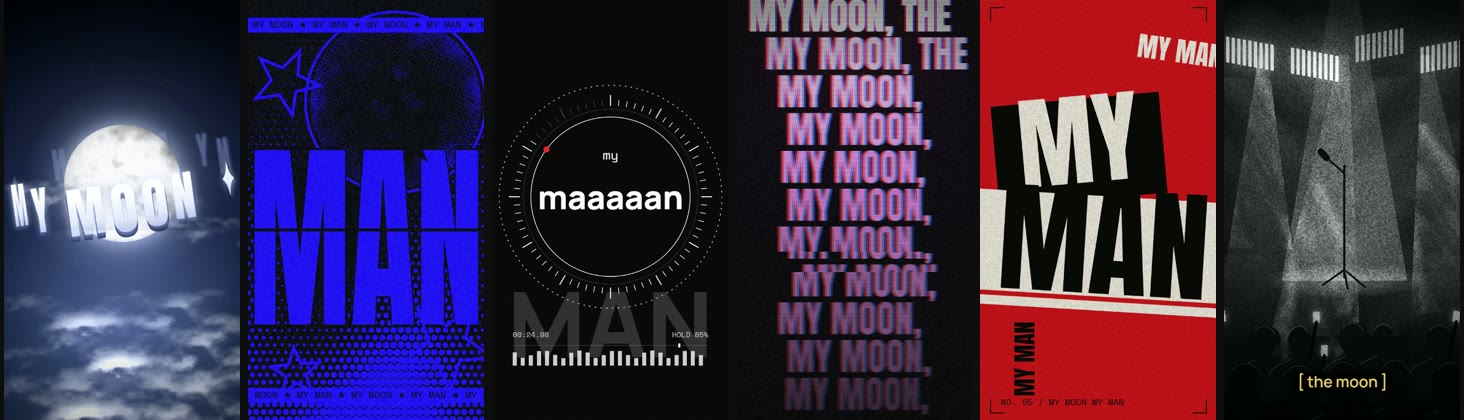
These are the six lyric video styles from our TikTok video “6 Claude lyric video styles (steal the prompts)”. Every style sings the same line, “my moon, my man”, from the FINNEAS live cover of Feist’s My Moon My Man, so you can compare them like for like. Claude wrote the code that draws every frame; there is no video model and no stock footage.
How to use these prompts
Each prompt is written to be pasted into Claude with your own song. Add two things under it:
- The timed lyrics of the part you want: each word or line with the second it is sung. A lyric video lives or dies on timing, so this matters more than any adjective in the prompt.
- The BPM, if the style hits on the beat (Y2K duotone, kinetic mograph and poster type all do). In Claude Code you can give it the audio file instead.
For example, under the prompt:
Song: 123 BPM. Lyrics, in seconds from the start of the clip:
0.00 my
1.40 moon
2.16 my
2.74 man (held until 7.70)
Some prompts name the moon because our line is about the moon. Swap it for the image in your song: a car, a city, a face, a flower.
A note on how these were made: we built all six looks in Claude for one video, then wrote each prompt from the finished look. A fresh Claude session will give you its own take on the style, close to ours but not the same frame for frame. Ask for changes in the same chat (“bigger words”, “slower ring”) until it matches your song.
1. 3D type
Words with real thickness orbiting the subject of the song in 3D space. The look of the 3D typography edits all over TikTok, with depth of field on the letters at the back.
Make a lyric video as a single HTML canvas page, 1080×1920. The words orbit a glowing full moon in 3D space: the line sits on a tilted ring around the moon, letters have real thickness (a few darker layers behind each face), letters on the back of the ring are dim, mirrored and blurred, and the ring turns slowly so the line being sung passes the front. Night sky, stars, a sea of moonlit clouds drifting below, one wisp passing in front of the letters. The ring flies in from bigger on the first word. Time everything to the lyrics I give you.
2. Y2K duotone
Two colours, one giant word at a time, and the colours flip on every beat. Print grain and dithering make it feel like a 2000s flyer.
Make a lyric video as a single HTML canvas page, 1080×1920, in two colours only: pure cobalt blue and black. One giant condensed word fills the frame at a time, cut on the word it's sung on. On every beat, paper and ink swap (blue on black, black on blue) with a small jump. Behind the word: a 1-bit dithered moon, a halftone dot field, outlined stars spinning, and a scrolling ticker of the lyric in a mono font at the top and bottom. Add print grain. Nothing outside the two colours.
3. Kinetic mograph
Minimal kinetic typography: thin lines, a ring of tick marks and a held note that grows a letter per beat. Good for a long held vowel or a quiet verse.
Make a minimal kinetic typography lyric video as a single HTML canvas page, 1080×1920: near-black background, thin white lines only. A ring of 72 tick marks lights up as a held note goes on, a thin circle draws itself on, a dashed circle counter-rotates, a red dot rides the ring, and a huge ghost letter word drifts behind at low opacity. The sung word sits in the middle; on a held vowel, add one more letter per beat ("maaan" → "maaaaaan"). Small mono UI labels: a timecode and a "hold %" readout, and a level meter.4. CRT repeat
The line repeats down the screen, each row a beat behind, with RGB split and CRT scanlines. It suits a chant or a repeated hook.
Make a lyric video as a single HTML canvas page, 1080×1920: the line repeats down the screen in tall condensed capitals, each row a little behind the one above, so every new word cascades down the stack. Red and blue offset copies under a white core (RGB split), CRT scanlines, a slow rolling bright bar, phosphor glow, vignette, grain. On each word, a short horizontal glitch slice shifts sideways.
5. Poster type
Red, black and off-white, with words that slam in at angles on blocks, like a gig poster being pasted up beat by beat.
Make a lyric video as a single HTML canvas page, 1080×1920, styled like a printed poster: red, black and off-white only. The first word slams in on a black block, tilted; the next slams in on a white bar, tilted the other way, each from bigger with a 2-frame shake. Then on every beat another copy of the line slams in at its own angle and size, some vertical, the later ones on their own blocks over everything. Crop marks in the corners, a small issue number, paper grain.
6. Concert caption
A grainy black and white concert clip with small bracketed captions, the format of the live lyric clips that go viral. The scene is drawn, not filmed.
Make a lyric video as a single HTML canvas page, 1080×1920, that looks like a black-and-white concert clip: a dark stage, louvred light panels with lens bloom, haze beams sweeping through drifting smoke, a follow spot on an empty mic stand, the crowd as head-and-shoulder silhouettes with rim light, some phones up that flash on the beat, the front row out of focus. Heavy film grain, vignette, a slow push-in. The lyric is small, lowercase and in square brackets, warm yellow on a dark box, and cuts hard to the next line on its first word.
Turn the page into a video
- Paste a prompt and your timed lyrics into Claude. It answers with an HTML file; on claude.ai it opens as an artifact that plays in the chat.
- For a quick clip, play it full screen and screen-record it.
- For a clean 1080 x 1920 export, ask Claude to draw every frame from a time value (a
drawFrame(t)function). A headless browser can then step through it frame by frame and FFmpeg joins the frames into an MP4. Our guide to making videos with Claude explains that pipeline. - Add the song. On TikTok, Reels and Shorts, post the silent video and pick the song in the app, then line up the start with your first word. For YouTube, use our add music to video tool.
Which style fits your song?
| Your song | Try |
|---|---|
| A big, dreamy chorus | 3D type |
| A punchy hook or a chant | Y2K duotone, CRT repeat |
| A long held note or a quiet verse | Kinetic mograph |
| A loud single, rock or rap | Poster type |
| A live version or a sad song | Concert caption |
No code? Use the lyric video maker
If you’d rather not prompt and record, our lyric video maker does the timing for you: search a song and its timed lyrics come with it, or drop your own file and tap the lines in. Eight styles, a 1080p MP4, free, no signup and no watermark. For the steps that apply to any lyric video, timing, safe areas and export sizes, see how to make a lyric video.
Questions
Can Claude make a lyric video?+
Yes, by writing code. Claude has no video model, so it writes a single HTML page that draws every frame on a canvas, timed to the lyrics you give it. You play the page in a browser and screen-record it, or export it frame by frame to an MP4.
What should I give Claude with the prompt?+
The lyrics of the part you want, each word or line with the time it is sung (for example 0.00 my, 1.40 moon, 2.16 my, 2.74 man), plus the BPM if the style hits on the beat. In Claude Code it can also work from the audio file in your folder.
Do I use claude.ai or Claude Code?+
Either. On claude.ai the HTML answer opens as an artifact that plays in the chat. Claude Code writes the file to your computer, which is easier when you want to export a clean MP4 or have it read the audio.
How do I add the song?+
For TikTok, Reels or Shorts, post the video without sound and pick the song in the app, so it uses the official sound. Line up the start in the app with the first word in your video. For YouTube, add the audio in any editor, or put the silent video and the song into our add music to video tool.
Do these prompts work in ChatGPT or Gemini?+
We made these looks in Claude. The prompts ask for plain HTML canvas code, so any model that writes code can try them, but the results will differ.
Can I use these prompts for my own songs?+
Yes, copy and change them freely. The song is a separate question: publishing a track you don't own can get the video claimed or muted, which our lyric video guide covers.
Sources, read November 16, 2026
Related
- How to make a lyric videoTiming, style, export specs and the mistakes to avoid.
- 19 animation styles with Claude promptsOne scene in 19 styles, each made from one prompt you can copy.
- Can Claude make videos?How the code-to-video pipeline works and where it stops.
- Best lyric video makersSixteen tools compared on timing, watermark, price.