Guides · Animation styles
19 animation styles, with examples and the prompts to make them
19 animation styles, from rubber hose and claymation to pixel art and kinetic type. Same scene in every style, each made by Claude from one prompt you can copy.
Updated November 14, 2026
In short
- Animation styles fall into a few families: hand-drawn and 2D, cutout and stop motion, 3D, and motion graphics. Inside them sit the looks people name, like rubber hose, anime, claymation, pixel art and kinetic type.
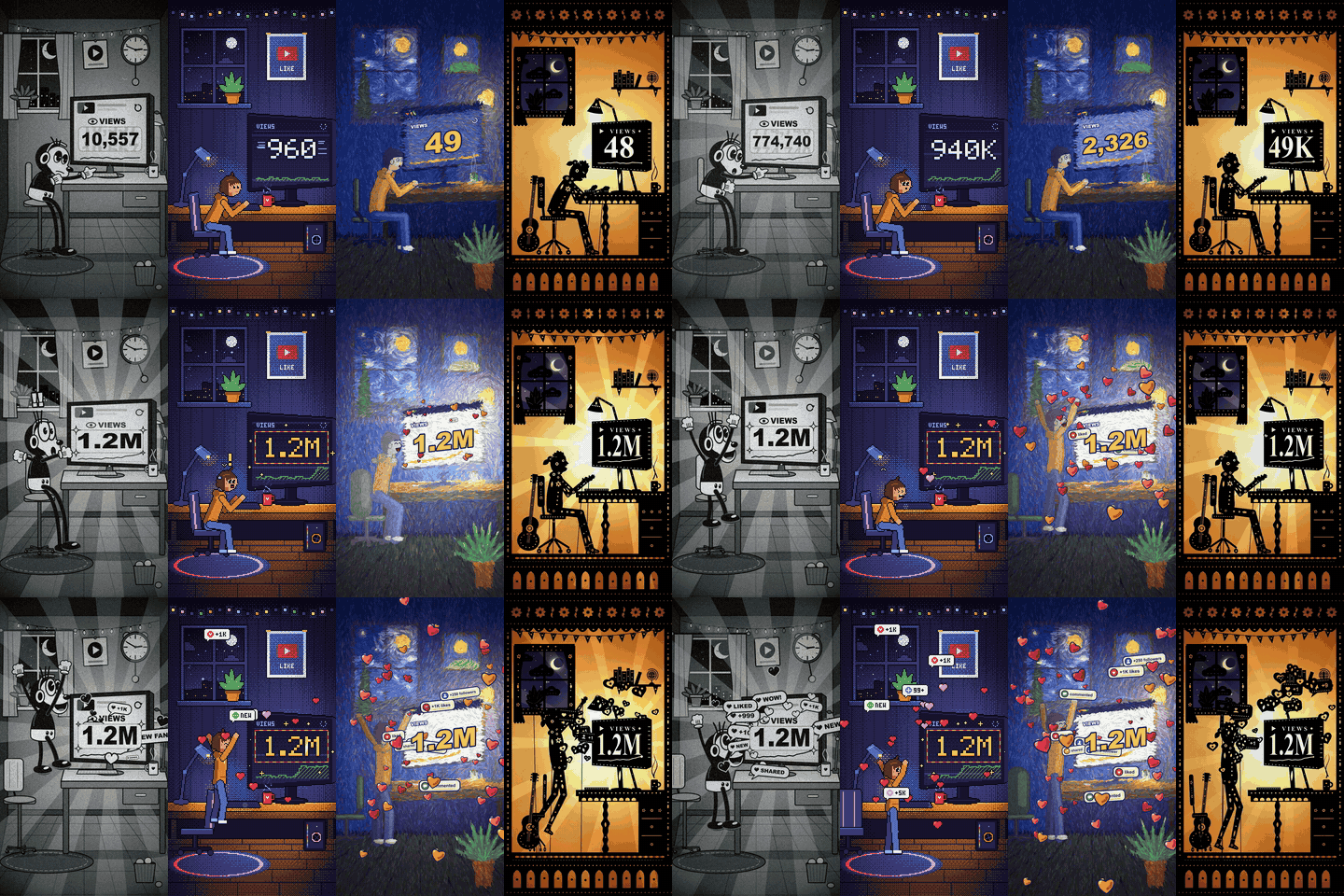
- Every example below is the same 8 second scene, made by Claude from a single prompt with no edits by us: 19 styles, one prompt each.
- Copy a prompt, paste it into Claude and swap in your own scene. You get an HTML file that plays in a browser and can be exported to MP4.
- Code fakes flat and stylised looks well. It can't do photoreal 3D, stop motion with real objects, rotoscoping or motion capture.
Most lists of animation styles show a still and a paragraph. This one shows every style moving, on the same scene, so you can compare like with like: a creator at their desk late at night watches the view counter crawl, then jump to 1.2M, and leaps out of the chair as the room fills with hearts. Each version was made by Claude from one prompt, and the prompt is under each clip.
- Flat motion graphics
- Rubber hose cartoon
- Pop art comic
- Chalkboard
- Whiteboard animation
- Ink wash (sumi-e)
- Anime
- Oil painting (Van Gogh style)
- Paper cutout
- Mixed media collage
- Silhouette (shadow puppet)
- Claymation
- Pixel art
- Low-poly 3D (PS2 style)
- Retro VHS synthwave
- Neon line
- Isometric
- Risograph print
- Kinetic typography
- Marble music
How we made these
We wrote one scene and one paragraph per style, and sent each prompt once to a fresh Claude Opus 5.5 session that knew nothing else. The HTML it returned is what you see, unedited, rendered frame by frame to a 1080 x 1920 MP4. Some sessions test-ran their file before answering. In claude.ai, an HTML answer like this opens as an artifact you can play in the chat.
Each style took Claude between 7 and 22 minutes and roughly 100,000 to 200,000 tokens. Two needed a second attempt: whiteboard, whose first two runs broke off (one hit a usage limit, one stalled), and claymation, whose first version looked like smooth 3D. We made the claymation paragraph more specific, and the prompt shown is the one that worked. An earlier round with a different scene, a kid flying a kite, came out in all 19 styles too; we switched to this scene because creators can actually use it.
The prompt template
Every prompt has three parts. The first line names the style. The scene is the same in all of them, so swap it for your own. The style paragraph is the part that changes, and it is shown under each clip below. The format part asks for a single HTML file drawn from a time value, which is what lets you export a clean video later.
The scene we used:
Scene: a young creator at a desk late at night in a small dark bedroom, lit by the glow of a big monitor and a desk lamp (window with night sky, a mug, a plant). The monitor is turned three-quarters toward us so its big view counter is readable. 0-3 s: they lean in, tired, refreshing; the counter creeps 12... 31... 48. At 3 s it suddenly spins up to 1.2M. They freeze for a beat, then leap out of the chair with arms in the air, the chair spinning away, as notification bubbles and hearts burst out of the screen and fill the room. 6.5-8 s: they drop back into the chair laughing while hearts still rain down. The number must be readable in every frame it appears. Everything on screen keeps moving, and the character is drawn in the same style as the world.
The format part:
Format: a single self-contained HTML file I can open in a browser. One <canvas id="c"> at 1080x1920 (9:16 vertical), scaled to fit the window. Draw everything with code, no image files. 8 seconds long, playing on loop (a cut back to the start is fine). Put all drawing in a function drawFrame(t) (t in seconds) that renders the frame for time t from t alone (seeded random, never Math.random while drawing), and play it with requestAnimationFrame. Also set window.drawFrame = drawFrame, window.END = 8 and window.ready to a promise that resolves when the page is ready to draw, so the animation can be exported frame by frame.
Describe your scene the way ours is written: who and where, then what happens second by second, then one rule that keeps the important thing readable. Timestamps help more than adjectives.
Hand-drawn and 2D styles
Flat motion graphics
Flat shapes with no outlines, a small palette, and motion that eases in, overshoots and settles. It is the house style of explainer videos, app promos and channels like Kurzgesagt.
Modern flat vector illustration, the look of a premium explainer video. Flat shapes, no outlines, a palette of 5 colours, a fine grain texture for depth. Easing on everything; secondary motion overshoots and settles like a damped spring, so hair, clothes and props follow through with a delay.
Clean on the first run, with follow-through on hair and clothes. Light enough to play live on a phone.
Rubber hose cartoon
The 1930s cartoon look: noodle arms with no elbows, pie-cut eyes, white gloves and everything bouncing to the beat, on scratchy black and white film. Early Mickey Mouse and Betty Boop, revived by Cuphead.
Black and white only. The character has pie-cut eyes, bendy noodle arms with no elbows, white gloves and big shoes. Everything bounces and squashes on a steady beat, two bounces a second: the character, the chair, the monitor, the props, even the walls. Animate on 12 fps steps. Old film look on top: grain, the whole frame jitters 1 to 2 px (gate weave), brightness flicker, occasional vertical scratches and dust, vignette. The motion must come from the characters bouncing, not only from the film noise.
One of the strongest results. Everything bounces on the beat, and the film wobble sells the period.
Pop art comic
Thick black outlines, flat primary colours, Ben-Day halftone dots and onomatopoeia bursts, after 1960s comic books and Roy Lichtenstein.
1960s pop art comic. Thick black outlines, flat primary colours, Ben-Day halftone dots for all shading, speed lines for motion, and a jagged onomatopoeia burst saying WHOA! that pops in at the big moment. A comic panel border frames the scene.
The WHOA! burst, halftone and speed lines all landed on the first run.
Chalkboard
Grainy chalk lines that draw themselves on a dark slate. Used for lessons and explainers that want a handmade classroom feel.
Chalkboard animation. A dark green-black slate with faint smudges of erased chalk. Everything drawn in chalk: grainy, broken lines built from many small semi-transparent dashes, coloured chalk accents (yellow lamp light, pink hearts). The room draws itself on in the first 1.5 seconds, then the story plays out in chalk, with chalk dust drifting.
The board is blank for the first moment while the room draws itself on, so start a video a second in.
Whiteboard animation
A marker draws the scene stroke by stroke on a white board, often with the pen in shot. The classic explainer format since RSA Animate.
Whiteboard animation. A white board with faint marker smudges. In the first 1.5 seconds the room draws itself in black marker line art, stroke by stroke, with a marker pen tip following the line being drawn; then the story plays out as marker drawings. One accent colour: a red marker for the counter and the hearts.
The marker draws the room in the first second and a half; red is saved for the counter and the hearts. Lettering uses system handwriting fonts, so it varies a little by computer.
Ink wash (sumi-e)
A few confident brush strokes, dry-brush gaps, pale washes bleeding into rice paper and a lot of empty space.
Ink wash painting (sumi-e). Rice paper with fibre texture and generous empty space, but the character is large: at least a third of the frame height. Furniture and room in a few dry brush strokes with flying-white gaps, the night window in pale diluted washes bleeding at the edges. The character in minimal, confident brush strokes. Red is the only colour accent: the counter and the hearts. Strokes paint themselves on in the first second and the ink spreads softly. A red seal stamp in a corner.
The red counter and hearts are the only colour, which makes the payoff pop. Starts on blank paper.
Anime
Cel-shaded characters with one hard shadow tone and a thin outline, over a painted background with soft light and bloom: the quiet bedroom scene of a hand-drawn anime feature.
Hand-drawn anime feature look. Cel-shaded character: flat colours, one hard-edged shadow tone, a thin dark outline. Painterly background: a cosy cluttered bedroom at night, cool blue moonlight from the window against warm lamp and screen light, soft bloom, light particles drifting. Hair and clothes react to every movement.
The room and light came out well; the faces lean more Western cartoon than anime. Add "large anime eyes, thin line art" to push it closer.
Oil painting (Van Gogh style)
Every frame built from thick brush strokes that follow the forms and swirl around the lights, like a Van Gogh that moves. The film Loving Vincent painted all of its frames this way by hand.
An animated oil painting with Van Gogh style brushwork, like the film Loving Vincent. Build the whole frame from thousands of short, thick brush strokes that follow a flow field: swirls in the night sky and around every light source, strokes following the forms of the walls and furniture. Strokes keep fixed positions while their colours shimmer and the swirls slowly turn, so the painting itself moves. Cobalt, ultramarine, chrome yellow, viridian. Dark blue outlines on the character; smaller strokes on the face so it stays readable.
The heaviest file here: 60 to 85 ms a frame, so it plays live at about 12 to 16 fps. Export frame by frame for a smooth video.
Cutout and stop-motion styles
Paper cutout
Flat coloured paper with scissor-cut edges, small drop shadows and jointed paper puppets moved a step at a time. South Park began as real paper cutouts.
Cut-paper stop motion. Every element is a flat piece of coloured paper with slightly irregular scissor-cut edges, a soft drop shadow underneath as if it sits a few millimetres above the page, and a faint paper fibre texture. Saturated flat colours, no gradients. The character is a jointed paper puppet: limbs rotate around pinned joints. Animate on 12 fps steps so it feels moved by hand.
Hearts spill from behind the monitor so they never cover the number, a choice Claude made on its own.
Mixed media collage
Torn paper, newspaper print, halftone photos and masking tape, rearranged frame by frame. Common in music videos, editorial explainers and Terry Gilliam's Monty Python sequences.
Cut-up collage stop motion. Build everything from paper scraps: torn-edge paper walls, a window cut from a magazine photo with halftone dots, furniture from newspaper with tiny lines of fake print, the character as a cut-out with a white sticker border, hearts cut from patterned wrapping paper. Masking tape on some corners. Pieces move at 8 fps with slight jitter, as if repositioned by hand. A red marker scribble arrow points at the counter.
Busy by nature. It handled the newspaper fills, sticker borders and tape without help.
Silhouette (shadow puppet)
Black cut-out figures with carved decoration in front of a glowing backlit screen, jointed and worked on rods. Lotte Reiniger made the oldest surviving animated feature this way in 1926.
Shadow puppet theatre, like Lotte Reiniger's silhouette films. Black cut-out figures and furniture with lacy carved holes as decoration, in front of a glowing backlit paper screen: a warm amber gradient, brightest in the middle as if an oil lamp burns behind it, with a slight flicker. Figures are jointed with visible rivets and move stiffly around the joints, worked by thin rods coming up from below. The counter glows through the screen as cut-out numbers. Animate on 10 fps steps.
Strong on the first run. The counter glows through the screen as cut-out numbers.
Claymation
Plasticine characters and sets, re-posed and shot one frame at a time, with thumbprints and a little wobble left in. Aardman's Wallace and Gromit is the reference.
Claymation, like a British stop-motion clay film. Everything must obviously be plasticine: chunky simplified forms, a big round head with a wide clay mouth and bead eyes, visible thumbprints, sculpting tool marks and smudges, slightly lumpy uneven surfaces, a matte satin sheen (not glossy plastic, not smooth 3D, not a flat illustration). Strong soft key light with real cast shadows on the desk and wall. The set is built from clay, felt and cardboard. Shallow depth of field, slight vignette. Animate on twos (12 fps steps) and give every object a tiny frame-to-frame wobble of position and outline, as if each frame was re-posed by hand. Hearts and bubbles are clay too and stay around the character, never over the face.
The hardest look for code. Our first version came out as smooth 3D; naming thumbprints, tool marks, a matte sheen and real cast shadows got this chunkier, handmade result.
Retro and digital styles
Pixel art
A small pixel grid scaled up crisply, a limited palette and sprites animated in a few frames per cycle: the look of 16-bit games.
Draw on a 180x320 pixel grid and scale it up 6x with crisp nearest-neighbour scaling (no smoothing). Limited 16-colour palette, every sprite outlined with a 1-pixel dark outline, dithered gradients for the light and the sky. Animate in steps at 12 fps with 2 to 4 frame sprite cycles, like a 16-bit game; the counter uses a chunky pixel font.
Clean on the first run, drawn on a 180 x 320 grid and scaled up six times.
Low-poly 3D (PS2 style)
Few, flat-shaded polygons at a low resolution: the look of PlayStation 2 era games, now a nostalgic style in indie games and edits.
Low-poly 3D like a PlayStation 2 game. Use three.js from https://cdn.jsdelivr.net/npm/three@0.160.0/build/three.module.js with flat shading and very few polygons, colours from vertex colours, rendered at 360x640 and upscaled with crisp pixelated scaling to 1080x1920 for that era's look (use preserveDrawingBuffer). The camera slowly drifts around the desk. The counter is a canvas texture on the monitor.
Uses three.js from a CDN, rendered at 360 x 640 and scaled up with hard pixels for the period look.
Retro VHS synthwave
Neon magenta and cyan, a perspective grid and a striped sunset, with a worn VHS tape on top: channel offset, scanlines and tracking noise.
80s synthwave on a VHS tape. Magenta and cyan neon outlines with glow, a perspective grid floor, a striped neon sunset through the window, chrome-style numbers on the counter. VHS finish: RGB channel offset, scanlines, a tracking noise band rolling down the screen, slight tape wobble, a PLAY label in the corner.
The PLAY label and tracking band are part of the drawing, so they export with the video.
Neon line
The whole scene drawn as glowing tubes, like neon signs on a dark wall, with one tube flickering.
Neon line art on a near-black background. The whole scene is drawn as glowing tubes like neon signs: room, desk, character, monitor and hearts. Each tube has a bright white core and a coloured bloom (shadowBlur and additive blending), in hot pink, cyan, amber and violet. One tube flickers like a faulty sign. The tubes trace on in the first second.
Draws itself on in the first second. The glow is the heaviest part on older phones.
Isometric
A cutaway room seen from a fixed 30 degree angle with no vanishing point, clean shapes and three tones per surface. Popular in tech explainers and games like Monument Valley.
Isometric illustration. The bedroom is a small isometric cutaway room (floor and two walls) seen from a 30 degree isometric angle, floating on a plain background. Clean geometric shapes, light from the top left, three tones per surface. Tiny details: a bed, a shelf, a plant, a sleeping cat that wakes up at the big moment.
The room sits small in the middle of a tall frame; ask for a closer camera if you want it bigger.
Print and type styles
Risograph print
The look of a risograph print: a few fluorescent spot inks, grainy halftone and colour layers that never quite line up.
Risograph print look. Strictly three spot inks, fluorescent pink, teal blue and yellow, plus the off-white paper: no other colours and no black. Every shade comes from halftone density and from inks overlapping and multiplying into new colours. Each ink is its own layer with grainy halftone texture, misregistered by 4 to 8 px and drifting a little frame to frame, so the misregistration is clearly visible. Animate on 12 fps steps; the paper texture stays fixed.
Kept to three inks with visible misregistration. Heavy: about 12 fps live, so export frame by frame.
Kinetic typography
Words are the actors: they slam in on the beat, scale up and take over the screen. Used for lyric videos, quotes, title sequences and ads.
Kinetic typography: tell the story mostly with words, next to a minimal pictogram figure at the desk. Bold condensed type. LATE. NIGHT. 12 VIEWS. slam in one word at a time on a beat; at the big moment the number 1.2M takes over the whole screen and the words OH and MY and GOD fly in. Plain colour field background, two colours plus black and white, one focus at a time; no background word textures.
Uses Impact if your computer has it. The plain colour field keeps one word in focus at a time.
Beyond the scene: marble music
The 19 styles above all redraw one scene. This one comes from our marble music video: a walnut and brass bell tree where red marbles play Carol of the Bells, every strike exactly on its note. Claude places the bells from the music, not the other way round, which is the part nobody can do by hand. Turn the sound on: the bells are the whole soundtrack.
Marble music is a viral format on TikTok: a marble bounces from note to note and plays a tune you know. The trick is to fix the note times first and solve every bounce backward from them, so the timing is exact by construction.
Make a marble machine that plays Carol of the Bells, with every hit exactly on its note.
1. Write the score first: every note gets an exact time (3/4, quarter = 180, so one bar = one second and every note lands on a frame).
2. Solve each marble's path backward from those times: at each bell pick the bounce angle and restitution, let gravity carry the marble over the gap to the next note time, and hang the next bell where it lands. Search the angles so no bells overlap and no flight clips another bell.
3. Render it in three.js: brass bells, red lacquer marbles with a band so the spin shows, walnut, warm light, depth of field and motion blur. Synthesise each bell's sound from the same strike table, so picture and sound can't drift.
Not one prompt and one run like the 19 above: this took a full Claude Code session with a few rounds of feedback (the first steel marbles vanished against the dark room, so they became red). The prompt is those steps condensed. It is 3D in three.js, rendered frame by frame at about 0.35 s a frame, so it doesn't play live. The melody is Shchedryk (1916), public domain.
Styles code can’t fake
A few styles are about how the frames are made, and a prompt can’t change that:
- Traditional hand-drawn (cel) animation. Code can imitate the look, as the anime and rubber hose examples do, but it doesn’t draw like an animator, frame by frame with acting in every pose.
- Photoreal or Pixar-style 3D. That needs a 3D package, rigged characters and a renderer. The low-poly example is as far as a browser page goes comfortably.
- Stop motion with real objects. Claymation and paper cutout above are drawn to look photographed. Real stop motion is a camera and a lot of patience.
- Rotoscoping and motion capture. Both start from filmed footage of real people. Claude can’t watch video, so it can’t trace or track it.
For those, use a video model such as Veo, Kling or Runway, or the tools in our motion graphics software guide.
Get all 19 styles as a Claude skill
If you’d rather not copy prompts one by one, download the animation styles skill (free, a few KB). It is one SKILL.md with every style paragraph above, the format rules and a note on how to write a scene. Upload the zip under Skills in claude.ai’s settings, or unzip it into ~/.claude/skills/ for Claude Code, then just ask for “my scene, in claymation style”.
Turn a prompt into a video
- Paste the prompt into Claude. It answers with an HTML file; on claude.ai it opens as an artifact that plays in the chat.
- For a quick clip, play it full screen and screen-record it.
- For a clean export at full size, the format part of the prompt sets up a
drawFrame(t)function. A headless browser can step through it frame by frame and FFmpeg can join the frames into an MP4. Our guide to making videos with Claude explains that pipeline. - For a GIF, drop the video into our video to GIF tool.
Which animation style should you use?
| You want | Try |
|---|---|
| An explainer that feels modern | Flat motion graphics, whiteboard, isometric |
| A meme or a nostalgic hook | Rubber hose, pixel art, retro VHS, low-poly 3D |
| Something that looks like art | Oil painting, ink wash, silhouette, risograph |
| Words that hit on the beat | Kinetic typography, neon line |
| Handmade warmth | Paper cutout, collage, claymation, chalkboard |
If you are not sure, run the same scene in two or three styles. It costs a few minutes each, and the right one is usually obvious once they play side by side.
Questions
What are the main types of animation styles?+
Traditional hand-drawn (cel) animation, 2D digital animation, 3D computer animation, stop motion (clay, puppets, cutouts, objects) and motion graphics. Most named styles, such as rubber hose, anime, claymation, pixel art, whiteboard and kinetic typography, are looks within those families.
What is the most popular animation style?+
In film and TV, 3D computer animation and 2D (including anime) dominate. In short social video, flat motion graphics and kinetic typography are the ones you see most, because they are fast to make and read on a small screen. Retro looks like rubber hose, pixel art and VHS do well as memes and hooks.
Can Claude make animations?+
Yes, by writing code. Claude has no video model, so it writes an HTML page that draws every frame from a time value, which a browser plays and a renderer can export to MP4. All 19 examples on this page were made that way, from one prompt each.
Do these prompts work in ChatGPT or Gemini?+
We only tested them in Claude. They ask for plain HTML and canvas code, so any model that writes code and previews HTML can try them, but the quality will differ.
How do I make the animation longer or a different size?+
Change the length and size in the format part of the prompt, for example 15 seconds at 1920 x 1080 for YouTube. Longer pieces work better when you describe the beats with timestamps, as our scene does.
Can I use these prompts for my own videos?+
Yes, copy and change them freely. What Claude makes from them is covered by Anthropic's terms for your account.