Effects · Tool 70 · Lower third · Free · No signup
Lower third maker.
Type a name and a title, pick one of four looks, and get an animated lower third that slides in, holds and slides out. 1080p MP4 on green or blue screen, ready to key over your video in any editor. Free, no watermark.
1080p, 30 fps, on pure green (#00B140). Free for any use, no watermark, no sign-up.
Made with this tool
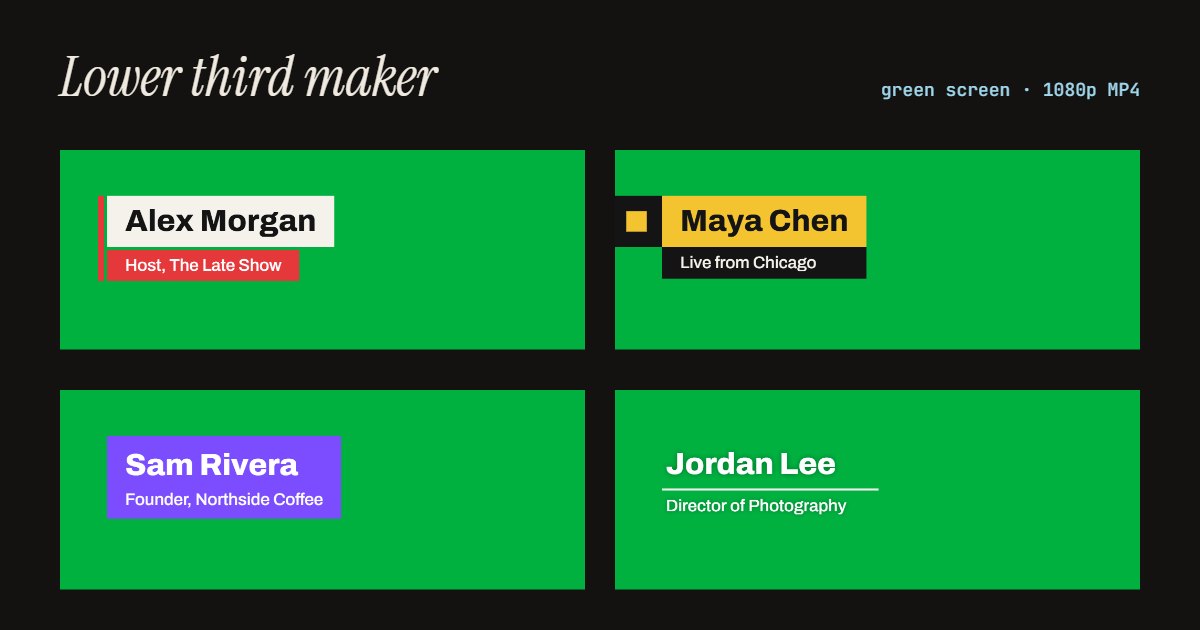
How to make a lower third
- Type the name, and a title if you want one.
- Pick a look, an accent colour, a light or dark panel, and left, centre or right.
- Choose how long it stays on screen, the frame (16:9 or 9:16) and green or blue screen.
- Press Export MP4, then put it above your video in any editor and key out the green.
Related
Questions
What is a lower third?+
The caption in the lower part of the screen that says who is speaking or where you are: a name and a title, like "Alex Morgan, Host". It comes from TV news and interviews, and it is how YouTube videos, podcasts on video and presentations introduce a speaker without cutting away.
How do I make a lower third?+
Type the name and the title on this page, pick a look, a colour and which side of the screen it sits on, and choose how long it stays. The preview loops as you change things. Press Export MP4 and you get a 1080p video of the lower third animating in, holding and animating out, on green or blue screen.
How do I put it on my video?+
Put the MP4 on a track above your video in any editor (CapCut, Premiere Pro, DaVinci Resolve, Final Cut, iMovie) at the moment the person appears, and key out the green with the editor's chroma key or green screen effect. The lower third stays and the green turns transparent. Use blue screen if your accent colour is green or teal.
Can I get a transparent lower third with no green screen?+
A transparent MOV, with an alpha channel and nothing to key out, is part of Pro, which is not open yet. Green screen gives the same result in every editor for free, and keying a flat green with no motion blur is clean.
Which look should I use?+
Accent bar and News read as broadcast: strong, good for interviews and explainers. Thin line is quiet and editorial, white text over the picture, for documentaries and vlogs. Solid block is one bold card in your colour, good for brands. All of them work at 16:9 for YouTube and 9:16 for Shorts, Reels and TikTok, where the lower third sits higher to clear the app's captions.
Can I use it in commercial videos?+
Yes. Everything you export is yours to use anywhere, in client work and ads too, with no watermark and no credit needed.
Is anything uploaded?+
No. Your browser draws every frame and writes the MP4 on your own device. No app, no account, and we count only that a lower third was made.