Effects · Tool 33 · Copy and paste · Free
Glitch text generator.
Type anything and it comes back glitched: buried in stacks of marks (zalgo, cursed, creepy text) or spelled with look-alike letters (glitch fonts). Set how much, copy it, paste it into a bio, a chat or a caption.
01 Your text
ģ͎̻ͤ̊̊ͪl̸̮͕͈ͣ͂ì͔̟̞ͭͣt̫̯̳͂̊ͮc̨͙̽͛̆h҉̊ͪ̾̀ t̠͛͊͒̏é̟̦̹̠͊̃ͨx͇̲̋̄͝ͅt̳͙͓̰ͤ̆͛͂̕ͅ
Paste it into a bio, a chat, a post or a caption. Name fields are stricter and tall stacks spill into the lines around them, so use Mild for usernames.
02 Glitch · Glitch
03 More glitch styles
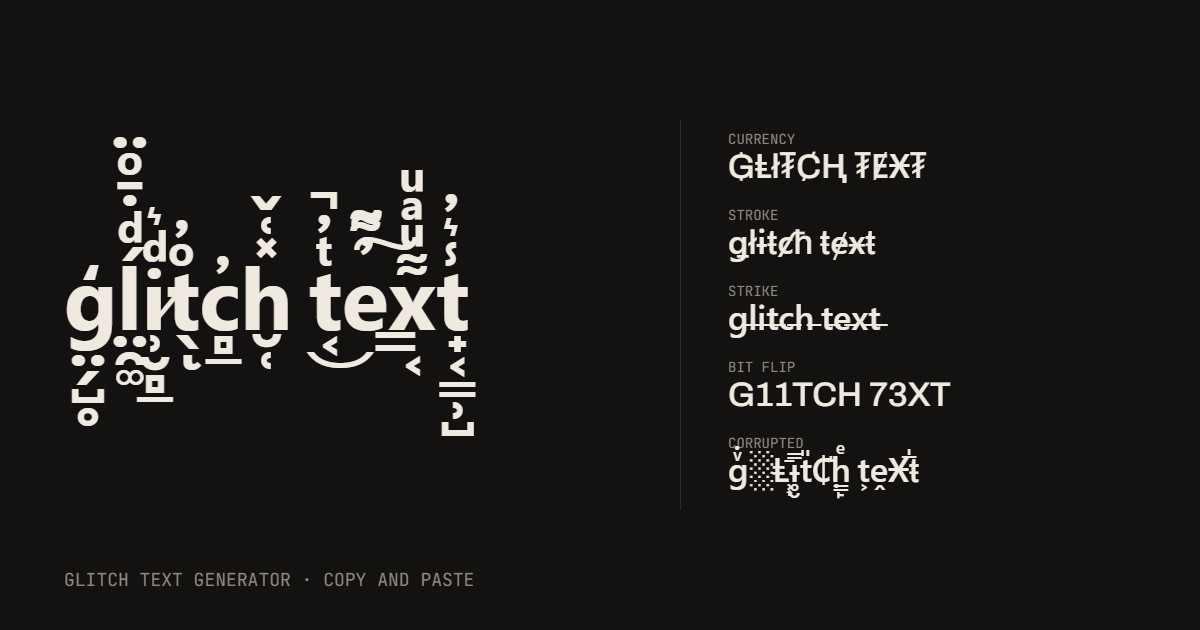
- DripDripg̪͔ͅl͓̮̼̦i̜̱͔ͅt͈c̭̺̺ḥ͈̥͎͙ t͖͚e͓x̻̱̲̗t̗͓ͅ
- HaloHalog̈́ͭͤlͫ̂ͣ͂ȋ́ͭͣtͦc̃̔̽hͦ̊ͪ̾̚ tͯ͛eͬx̽́̋̄t̎ͫͤ
- StaticStaticģl̸̴ì̶tc̨h҉͠ t͡ex͝t̕
- StrokeStrokeǥłɨŧȼħ ŧɇӿŧ
- CurrencyCurrency₲Ⱡł₮₵Ⱨ ₮ɆӾ₮
- StrikeStrikeg̶l̶i̶t̶c̶h̶ t̶e̶x̶t̶
- SlashSlashg̸l̸i̸t̸c̸h̸ t̸e̸x̸t̸
- Bit flipBit flipGLI7CH 73XT
- CorruptedCorrupted₲̥̈́ͅ▓Ⱡ̼͐ɨ̃ͭ▓ẗ́₵̷Ⱨ̹̄ tẹ͂̍x̳ͤ₮̤̜͊ͦ
Drip, Halo and Static follow the intensity above; the rest swap letters for look-alikes and stay as readable as they look.
Want it to actually glitch? Open the same words in the glitch effect: they split, tear and flicker, and you take an MP4 or a GIF for a video or a stream.
Animate itWhat it makes
How to make glitch text
Glitch text looks broken on purpose: the letters seem to leak, drip and crackle, as if the screen showing them were failing. It works because Unicode lets any number of combining marks follow a letter, and every app draws all of them, stacked, above and below the line. Turned low, it is a little static round a name; turned up, the words disappear under it.
The stacks are random, but each letter keeps its own pattern while you type, so the start of a word does not reshuffle as you finish it. When you want a different pattern for the same words, press New mix.
- Type or paste your text in the box. The glitched version appears as you type.
- Pick Mild for a username, Glitch for a bio, Corrupted or Cursed for a meme or a horror post, or set the intensity yourself.
- Choose where the marks go: above, through or below the letters. New mix gives the same words a different pattern.
- Press Copy glitch text, or Copy next to one of the glitch font styles under it, and paste it where you want it.
Related
Questions
How does glitch text work?+
It is ordinary text with marks piled on. Unicode has combining marks, the accents and dots meant to sit on a letter, like the two dots of ü, and it puts no limit on how many can follow one letter. The generator adds a random handful above, through and below each one, and whatever shows the text draws them stacked on top of each other, so they spill up and down out of the line. No font is involved, which is why it survives a copy and paste.
Is it the same as zalgo, cursed or creepy text? And what is a glitch font?+
Zalgo, cursed, creepy and glitch text are names for the same trick, piled-on marks, at different strengths. A glitch font is something else: each letter swapped for a look-alike from another alphabet or a currency sign, like ₲Ⱡł₮₵Ⱨ, which stays one character per letter and keeps the line tidy. The page makes both: the stacks with the controls at the top, the look-alikes in the list below them.
Where can I paste it?+
Anywhere that takes text: bios, posts, captions, chats, comments, documents. How it looks depends on the app and its fonts, and some trim the marks or refuse them, name fields most often. Tall stacks also run into the lines above and below, which some apps cut off. For a username, use Mild or one of the glitch fonts and check it in the app before you rely on it.
Why does it count as so many characters?+
Every mark is a character of its own. Eleven letters at Glitch strength come to about 70 characters, at Cursed to about 200, and a length limit, like a bio or a username, counts all of them. The number under the result is the count an app will see; lower the intensity, or switch off one of the three places, to bring it down.
How do I turn glitch text back into normal text?+
Paste it into the box at the top. When it holds glitch marks, a Remove the marks button appears and strips every one, leaving the plain letters. Accents go with them, because an é is an e with a mark of the same kind; the look-alike letters of a glitch font stay as they are.
Can screen readers read it?+
Not well. A screen reader may read the marks out one by one or skip the word, and a glitch font is often spelled out as foreign letters or symbols. Keep anything people need to understand, a name, a link, an instruction, in plain text, and use glitch text for decoration.
Can I make glitch text that actually moves?+
Not as text: an app shows the characters still. For a moving version press Animate it, which opens the same words in our glitch effect, where they split into red, green and blue, tear and flicker, and come out as an MP4 or a GIF for a video, a stream or a post.